
From Superinnovators 07/08/23
Joonyong Moon, an esteemed artist and technician, is pushing the boundaries of interactive media art with his innovative Augmented Shadow series.
His work, which merges the realms of technology and art, has been captivating audiences with its unique blend of storytelling and immersive experiences.
The Augmented Shadow series, which implements augmented reality using shadows, is a testament to Moon’s vision and creativity.

Moon’s Augmented Shadow technique creates an optical illusion where flat shadows appear three-dimensional to the viewer.
This original illusion is used in a unique way of storytelling, engaging the audience in a narrative about shadow kids who come and go between 2D and 3D.
The story progresses as the viewer finds and approaches the shadows who call him here and there.
The immersive environment, the viewer’s light, the shadows, and the optical illusion are all incorporated into the narrative, engaging the viewer completely.

One of the most notable installations in the Augmented Shadow series is “Chasing Stars in Shadow.”
In this installation, Moon uses a specially designed device called the Tracker to detect the audience’s position and guide them through a world of experimental art.
As the audience moves, the Tracker maps virtual shadows to the actual shadows of objects, creating a dynamic and interactive experience.
The audience’s light in the Tracker moves the shade and shadows of an entire room that is an 8m x 8m x 4.2m immersive projection environment, making audiences feel as if they are standing within a virtual space.
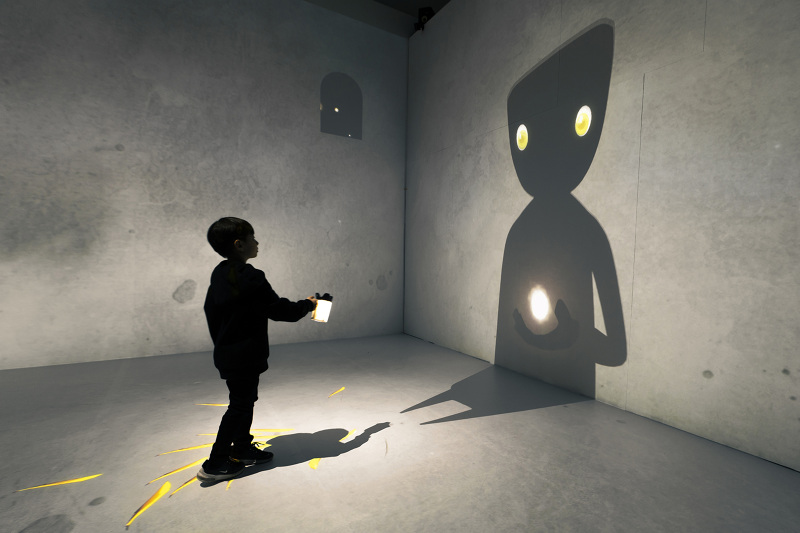
Moon’s work has been showcased in various venues, but one of the most significant exhibitions took place at the Gwangju Museum of Art, located in the vibrant city of Gwangju, South Korea.
The exhibition, titled “Joonyong Moon: Augmented Shadow,” ran from June 9 to July 30, 2023.
It was a standout event in the Gwangju Museum of Art’s calendar, attracting a large number of visitors and receiving widespread acclaim.
The exhibition at the Gwangju Museum of Art was a testament to the power of interactive storytelling and the possibilities of interactive media art.
It offered a new perspective on the relationship between technology and art, making it a must-see for anyone interested in the future of art and storytelling.



References:
Legiano Casino Bewertung http://kimberly-club.ru/bitrix/redirect.php?event1=&event2=&event3=&goto=https://goz.vn/latashacal
References:
KingMaker Casino Mindesteinzahlung 5 Euro https://innvo.pro/leialabill
References:
KingMaker Casino Einzahlung und Freispiele smartbusinesscards.in
References:
KingMaker einzahlung klarna https://jagoan-hosting.online/nickolashartz
References:
Kingmaker casino bonus code einzahlung http://alt1.toolbarqueries.google.com.ai/url?q=https://de.trustpilot.com/review/beyondjewellery.de
References:
Kingmaker Casino Legal https://tdck.sakura.ne.jp/ClubSweets/nyanco.php?url=https://de.trustpilot.com/review/beyondjewellery.de
References:
KingMaker Casino Einzahlungsbonus ohne Umsatzbedingungen https://m.anwap.love/go_url.php?r=https://de.trustpilot.com/review/beyondjewellery.de
References:
KingMaker Casino schnelle Auszahlung http://burana.ijs.si/wiki14/api.php?action=https://de.trustpilot.com/review/beyondjewellery.de
References:
KingMaker Casino Einzahlung per Trustly http://maps.google.ca
References:
KingMaker Casino Einzahlungsmethoden redirect.camfrog.com
References:
Hitnspin casino erfahrungen maps.google.cat
References:
Hitnspin deutschland google.cd
References:
Hitnspin erfahrungen http://ellspot.de
References:
Hitnspin casino auszahlungsdauer cse.google.com.bh
References:
Hitnspin casino forum alpha.astroempires.com
References:
Hitnspin casino live spiele wiki.sukhoi.ru
References:
Lollybet Casino Auszahlung http://www.google.com.pa/url?sa=t&url=https://www.thetriumphforum.com/proxy.php?link=https://lollybet.com.de/
References:
Lollybet Freispiele quantum.astroempires.com
References:
Lollybet Casino Auszahlung google.com.iq
References:
Lollybet Casino Mobile technoplus.ru
References:
Lollybet Slots http://toolbarqueries.google.si/url?sa=i&url=http://csmouse.com/user/linebutane4/
References:
Lollybet Casino Live Casino http://www.google.com.cy/
References:
Lollybet Casino Mindesteinzahlung http://cse.google.mn/url?q=http://vistooapp.com/@beatrice65w605?page=about
References:
Hitnspin casino freispiele http://clients1.google.de/url?q=https://may22.ru/user/heatthread60/
References:
Hitnspin casino sicher http://clients1.google.fi
References:
Hitnspin casino forum clients1.google.no
References:
Hit n spin casino 25 euro code image.google.com.ag
References:
Legiano Casino Mindestauszahlung http://33.pexeburay.com/index/d1?diff=0&utm_clickid=34gcso08k8w4w40c&aurl=https://mk.cs.msu.ru/api.php?action=https://de.trustpilot.com/review/der-wikinger-shop.de
References:
Payid pokies aus strongholdglobalgroup.com
References:
Payid pokies instant withdrawal https://filuv.bnkode.com
References:
New payid pokies https://jobschoose.com/
References:
Online pokies australia payid real money https://realestate.kctech.com.np/
References:
Lollybet Bonus Code http://best5.ru
References:
Lollybet Casino Auszahlungsdauer https://www.jobui.com/
References:
Lollybet Casino Bitcoin http://maps.google.kg
References:
Lollybet Gutschein http://toolbarqueries.google.com.bo/url?q=https://millhive.co.uk/rustychappell7
References:
Lollybet Gutschein https://cm.lesta.ru/
References:
Lollybet Casino Verifizierung http://www.google.tn/
References:
Lollybet Kontakt http://maps.google.com.bz/url?q=https://cabseh.com/MRUOr
References:
Lollybet Casino Bonus https://podnova.com/
References:
Lollybet Casino DE http://cse.google.si
References:
Lollybet Casino App Download https://img.2chan.net
References:
Lollybet Casino Willkommensbonus https://www.omicsonline.org/
References:
Lollybet Casino Auszahlungsdauer https://www.google.am/url?sa=t&url=https://301.tv/gudrunknudson/
References:
Lollybet Support https://mcpedl.com
References:
Lollybet Casino Live Casino https://edufuture.biz
References:
Lollybet Casino Erfahrungen staroetv.su
References:
Lollybet Promo Code http://www.google.ht
References:
Lollybet Casino Review clients1.google.co.ls
References:
Lollybet Casino Blackjack https://board-cs.seafight.com
References:
Lollybet Casino App wiki.cockos.com
References:
Lollybet Casino PayPal http://clients1.google.bg
References:
Lollybet Casino Bonus ohne Umsatzbedingungen https://illustrators.ru/away?link=https://kleinanzeigen.imkerverein-kassel.de/index.php/author/leorapattes/https://illustrators.ru/away?link=https://kleinanzeigen.imkerverein-kassel.de/index.php/author/leorapattes/</a
References:
Lollybet seriös https://getskill.work/
References:
Lollybet Casino Bonus ohne Einzahlung https://git.biddydev.com/
References:
Payid pokies instant withdrawal http://cse.google.com.cy
References:
Sugar Hill Casino Bonus https://s3.amazonaws.com/new-casino/National-Casino-Einzahlung.html
References:
777 Casino App https://nasheed.ru
References:
Neosurf Casino Bewertung https://s3.amazonaws.com/new-casino/Pelican-Casino-Login.html
References:
Levant Casino Bewertung http://images.google.com.sa/
References:
Posido Casino Bonus ohne Einzahlung ceti.astroempires.com
Video Star’s keyframe editor is more like Adobe After Effects than Alight Motion or CapCut, letting you create animations and manually mask clips to the absolute millisecond. This isn’t doable in Alight Motion, so if you’re after a tool that irons out tiny details, Video Star’s worth using. Alight Motion is honestly great when it comes to fast video editing, and it has totally changed the game for me. Now I use it on my computer for bigger projects, so the interface could be a bit smoother. Alight Motion is a popular video editing and motion graphics application on mobile platforms, suitable for both beginners and professionals. With an intuitive interface, the application offers many powerful features such as multi-layer video editing, creating motion effects, and adding eye-catching visual effects.
https://paper.wf/arroterdi1981/beim-standard-spin-wert-von-0-10andnbsp-eu-entsprechen-50-freispiele-einem
Filmora: AI Video Editor&Maker Some of the popular free animation apps for iPad include FlipaClip, Animatic, and Picsart Animator. There are plenty of animation apps in the App Store, but we omitted those which don’t offer any of the three important features we have discussed above from our best cel animation apps list. Moving on from Animatic, let’s dive into Procreate. This powerful app, designed for iPad, lets you create hand-drawn animations with precision. With your Apple Pencil, you can craft intricate details like a pro. Procreate Dreams is far from the only animation app out there, nor is it the best – but it’s certainly shaping things up for amateur artists. That’s because it’s designed specifically to be used on iPads, it’s intuitive, and there’s no subscription – just a one-time payment of $19.99 £19.99 AU€29.99.